
Hue vs SwitchBot vs Aqara: 14 Months in One House
I bought the smallest kit from all three, ran them in a real house for 14 months, and logged what happened. 15,411 API calls, one five-hour outage, and the automations I killed.
Read this part if you don’t want to read the rest
Most people should buy SwitchBot. It has the widest lineup, it is the cheapest way in, and it is the only one of the three that drags the non-smart appliances you already own — the air conditioner, the blinds, the humidifier — into the system through infrared. If you want to try a smart home without running an evaluation first, this is the brand that will not waste your money.
Buy Hue if you want lights that react to you. Motion-triggered lighting is the one job where the difference is not subtle, and it is not close. Hue costs more. I pay it, in 27 bulbs.
Don’t buy Aqara for presence sensing. Its mmWave sensor reported people who weren’t there, in my house, repeatedly. The low price is real. So is the ghosting.
That’s the answer. The rest of this article is why I trust those three sentences, which is a different question from whether you should.
What is actually in the house
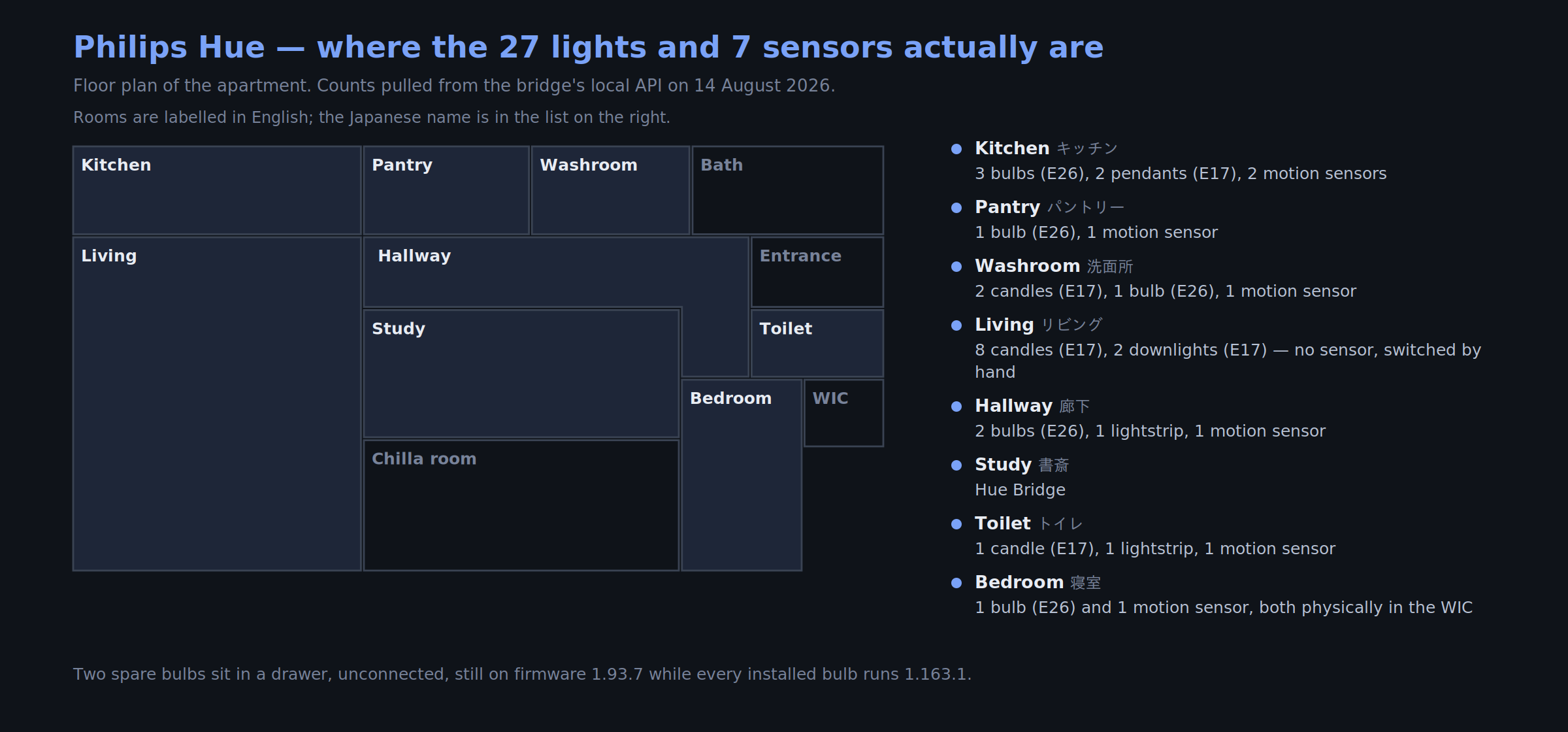
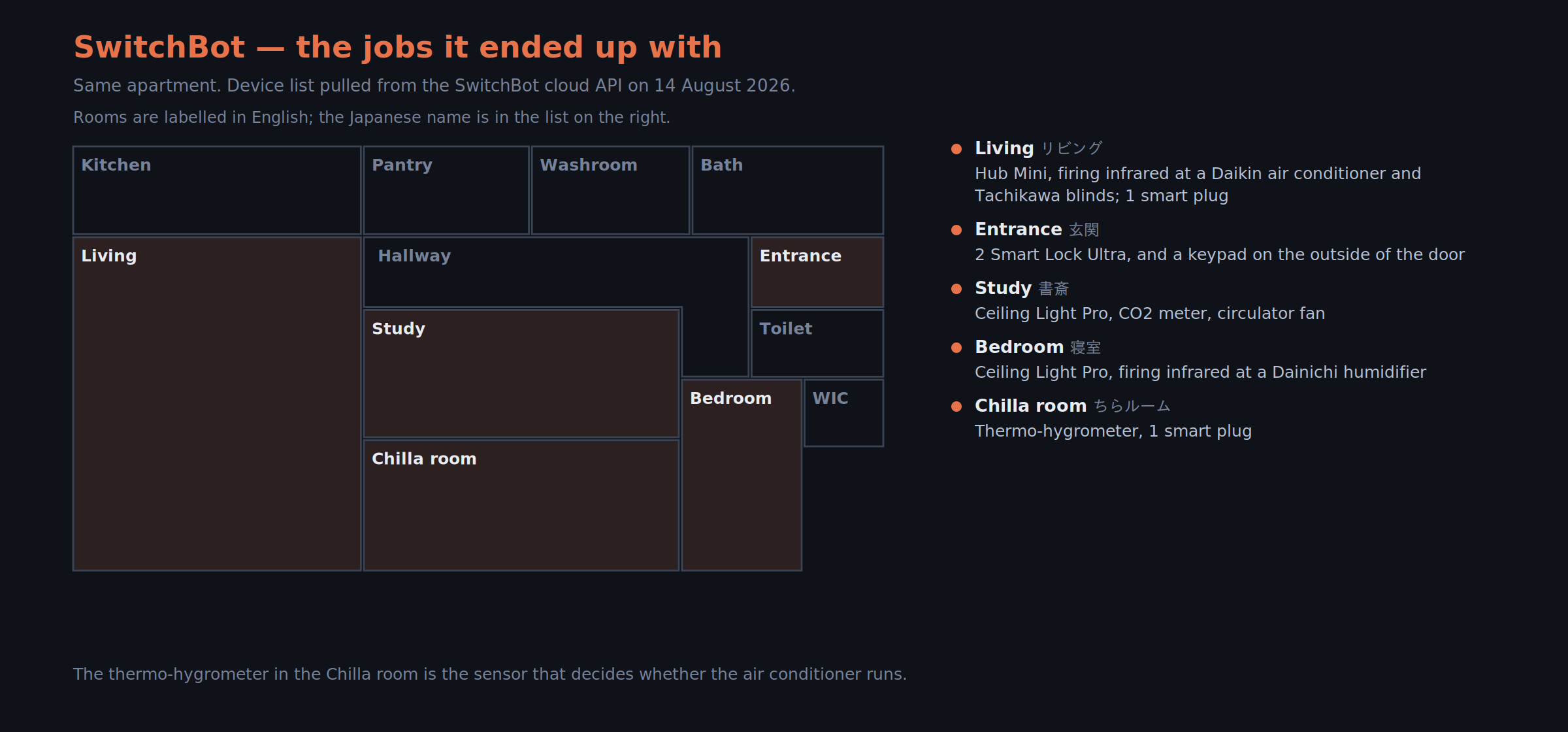
I moved in June 2025 and made as much of the new place smart as I could while the fixtures were still coming out of boxes. Everything below was pulled from each vendor’s own API on 14 August 2026 — not from memory, and not from a spreadsheet I keep.
| Philips Hue | SwitchBot | Aqara | |
|---|---|---|---|
| In service | 25 lights, 7 motion sensors, 1 bridge | 12 devices + 2 IR appliances | — |
| Owned, not in service | 2 spare bulbs | 1 Bot | 1 Hub M3, 2 bulbs, 1 FP2 sensor |
| Running since | June 2025 | June 2025 | evaluation only |
The Aqara column is the important one, and it is not a story about wasted money.
I didn’t choose. I bought the minimum and waited for something to break
I bought the smallest kit each brand sells — for Aqara, a hub, two bulbs and one FP2 presence sensor — put them in rooms I actually use, and waited.
That hub, those bulbs and that sensor are still here, unused, and they are the cheapest thing I bought all year. They are what it cost to find out that Aqara’s mmWave sensor sees people who aren’t there. The alternative was finding that out across seven rooms, after committing.
There is a caveat here I can’t wave away: I was moving house. Swapping every fixture is nearly free when the boxes are already open and nothing is installed yet. If you are living in your home right now, the same evaluation costs you evenings and a stepladder, and you should scale it down accordingly. This is the part of my method that doesn’t transfer, and I’d rather say so than sell you a process I got for free.
The thing that actually decided it was the socket
I would like to tell you I chose on protocols. I did compare them, eventually, and it mattered less than this: my ceiling fixtures take E17 bulbs.
E17 is the small screw base used throughout Japanese homes — roughly the equivalent of E12 candelabra in North America, or E14 in Europe. In the full-size base, E26/E27, every brand sells smart bulbs and the field is genuinely wide open. Step down one size and the shelf empties. When I was fitting out the house, Hue had E17 and most of the alternatives didn’t.
I tried the obvious workaround first: E17-to-E26 adapters. They work electrically. They also push the bulb far enough out of the fixture that it looks wrong, and I wasn’t comfortable with the fit or the heat inside an enclosed fitting. I stopped.
So the ecosystem decision that people write thousand-word comparisons about was settled, in my house, by a measurement I could have taken on day one with my eyes. Sixteen of my Hue lights are E17 candles. Nine are E26.
If you take one practical thing from this article, take this: go and look at your sockets before you read another comparison. If they’re all full-size, everything below is a genuine choice. If they’re not, the market has already chosen for you, and you should find that out before you fall in love with a brand.
Response time is the difference you only feel after you live with it
Hue responds in under a second — app or sensor, doesn’t matter. More importantly, it responds in under a second every time. The consistency is the thing you actually feel.
SwitchBot from the app takes one to two seconds. On paper that’s the same number. It isn’t the same experience when the action is “turn on the light I am currently standing under.”
The worst case in my house is the front door, and it’s less a product flaw than physics. The keypad is mounted outside — it does face recognition, though I mostly use the fingerprint reader — and the lock is inside. A door sits between them. From fingerprint to the lock actually moving takes about a second on a good day and around five on a bad one, and occasionally nothing happens and I present the finger again.
Bluetooth lives in the 2.4 GHz band that every other device in a home is shouting in, and unlike Zigbee it isn’t meshed: each device talks directly to its hub through whatever is in the way. Hue’s lights, by contrast, mesh with each other, and I have twenty-five of them spread through the house acting as repeaters. The protocol comparison people argue about online turned out to matter mostly through that one structural difference, plus the question of what your walls and doors are made of.
The same room, the same light, two sensors, two opposite failures
My study turned into a test bench, though I didn’t set out to build one. The ceiling light never changed — SwitchBot’s Ceiling Light Pro, mounted and staying there. Only the sensor changed.
First I tried Aqara’s FP2, an mmWave presence sensor. mmWave is sold as the upgrade over passive infrared: it’s supposed to see you when you’re sitting perfectly still, which is exactly what you do at a desk. What it saw in my study was people who were not there. The light came on for an empty room, and went off while I was sitting at the desk working.
Then I put SwitchBot’s Motion Sensor Pro in the same room, driving the same light. It failed in the opposite direction: it often didn’t react at all.
Two sensors, two failure modes pointing opposite ways, one conclusion — presence detection is not a specification you can read, it is a behaviour you have to watch in your own room. Both products are “compatible”. Both were installed correctly. Neither told me anything useful until it was on my ceiling.
There’s a third finding buried in that experiment, and it’s the one I’d have missed if I hadn’t run it: the study never needed a sensor at all. I turn the light on when I start working and off when I stop, hours later. The automation was solving a problem I didn’t have.
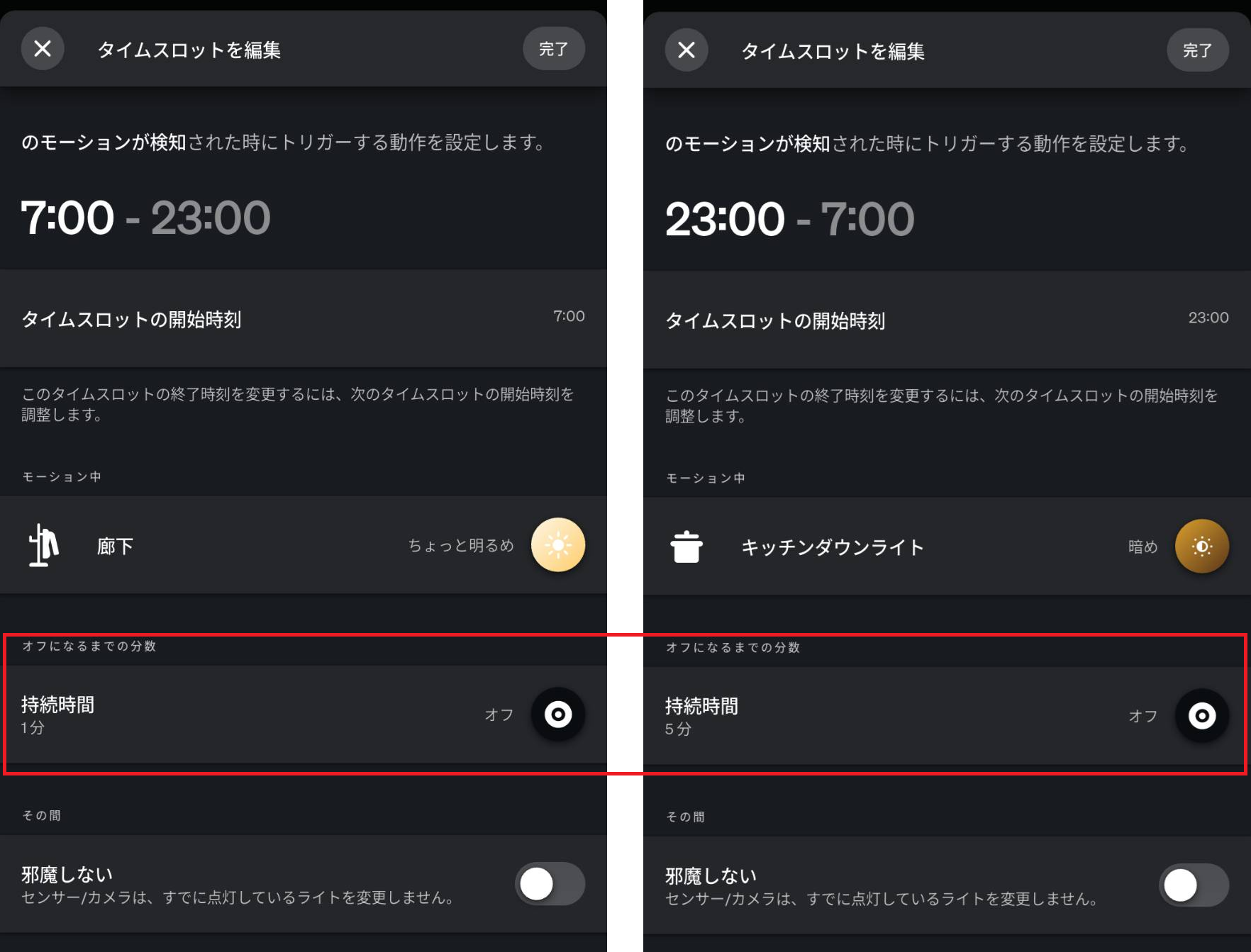
Motion-driven lighting went to Hue instead. Seven of its sensors are running right now, in the places where the light should already be on before I’ve finished thinking about it: kitchen, hallway, toilet, pantry, closet, laundry. The part nobody mentions is that the sensor is only half the job — the timeout is the other half. Mine are tuned per room: five minutes where I linger, one minute where I’m passing through. Too short is infuriating. Too long is a lit empty room.
The automation that worked perfectly and still failed
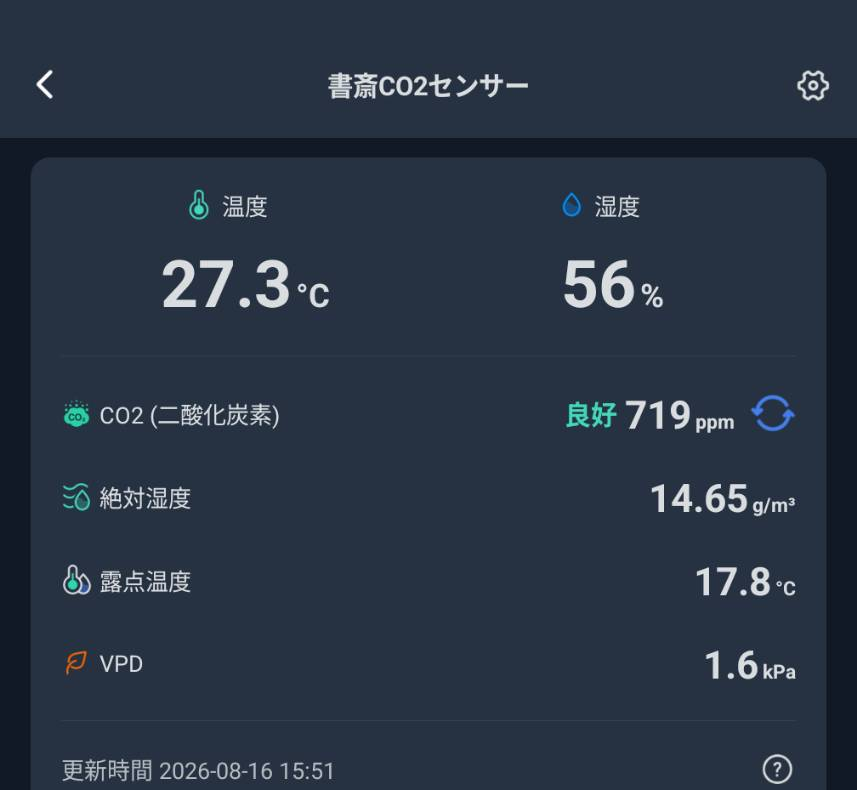
My study has no window. That’s a bad property for a room you work in all day, because CO2 climbs, and above roughly 1,000 ppm people start reporting drowsiness and headaches.
So when SwitchBot shipped a CO2 meter I bought one, added a battery-powered circulator fan, and wrote the obvious rule: above 1,000 ppm, turn the fan on.
The automation was flawless. It fired exactly when it was supposed to. The CO2 didn’t come down.
My apartment is airtight — which is a feature in every other context — and moving air around inside a sealed room does not remove CO2 from it. Ventilation means bringing outside air in and pushing inside air out, and that needs a real airflow path, not a fan pointed at a wall. Running the kitchen extractor did more in ten minutes than the circulator did in an hour.
I deleted the automation and kept the sensor. It was a bad trigger and it’s an excellent instrument: it tells me when to go and open something, which turns out to be the only intervention that works.
The general form of this failure is worth more than the specific one: an automation can execute perfectly and still fail to produce the outcome you wanted, because the outcome depends on physics the automation doesn’t touch. No app will tell you that. Only the number that refuses to move will.
I measured the cloud dependency for 109 days
This is the part no review has, because producing it meant running the thing for a third of a year and keeping the logs.
A Raspberry Pi in my house polls SwitchBot’s cloud API every ten minutes for the temperature in one room, then decides whether to run the air conditioner over ECHONET Lite, a local protocol. It’s been doing that since late April. Which makes it, by accident, an uptime probe for a smart-home cloud: fixed cadence, no gaps, 109 days.
- 15,411 polls
- 15,305 succeeded
- 106 failed — 0.69%
99.31% sounds like a good number and it’s very close to meaningless, because it hides the shape. Group failures that happened within fifteen minutes of each other into single incidents and you get 39 incidents. Thirty-one of them lasted exactly one cycle: ten minutes, self-healed, never noticed.

Then there was 1 June. From 01:15 to 06:19, thirty-one consecutive polls failed. Five hours and four minutes during which the system that decides whether my air conditioning runs had no idea what the temperature was.
Now the part that keeps this from being a hit piece. All thirty-one of those failures were DNS resolution failures. api.switch-bot.com never resolved. SwitchBot’s servers were never contacted, and a company can’t be blamed for a request that never left the building. Across the full 109 days, 87 of the 106 failures were name-resolution failures on my side; only 19 were read timeouts, and even those could be my line.
I could not determine which layer actually broke — the Pi’s resolver, the router, or upstream — because the network monitoring logs for that window are gone. I’d rather say that than pick a culprit that fits the story.
For comparison: over the same period, the local ECHONET Lite calls from the Pi to the air conditioner across my own LAN failed twice.
So the honest summary of cloud dependency isn’t “the cloud is unreliable.” It’s this: the cloud adds your own DNS to the list of things that can take your automation down, and your own DNS is worse than you think it is.
The fallback I had written down did not exist
While pulling those logs, I found something worse than the outage.
My controller’s configuration says the temperature source falls back to a wired DHT22 sensor when the SwitchBot read fails. The README says the same thing. The code says:
no working sensor configured (DHT22 fallback not implemented yet)In 109 days, across 106 failed cloud reads, the fallback produced exactly zero readings. It was never going to. I wrote the config. I wrote the README. I had never once watched the thing they promised actually run.
This is my own code and not a vendor’s, and that’s precisely the point. The five-hour outage was survivable, because a missed cycle corrects itself ten minutes later. The dangerous part was that I believed I had a safety net, so I stopped thinking about the failure mode entirely.
If you’re about to build anything on a cloud-dependent sensor, the question isn’t “does it have a fallback.” It’s “have I ever seen the fallback run.”
The two bulbs in my drawer are two firmware generations behind
The bridge reports 27 bulbs. Only 25 are in the ceiling. The other two are spares, and they’re not connected to anything.
Every installed bulb is on firmware 1.163.1. The two spares are on 1.93.7.
Bulbs update when they’re powered and reachable, and a spare is neither. So it doesn’t sit still — it drifts, quietly, for as long as you own it. The day the hallway bulb dies and you screw the spare in, you are not installing the same product the rest of the house is running.
It costs nothing to fix: power the spares up now and then and let them catch up. But nothing in the app tells you the drawer is falling behind. I only know because I queried the bridge directly while writing this.
What I would buy again
Hue: yes — and the honest reason isn’t flattering. The lights work, the sensors work, and switching now would mean re-buying 27 bulbs and rebuilding every automation in the house. That is lock-in, and I walked into it with my eyes open. I’d do it again anyway, because the single job I bought it for — lights that respond to people without irritating them — it does, every time, in under a second. It is expensive. It is the one thing here I don’t argue with myself about.
SwitchBot: depends on the product. The hub and its infrared bridging, absolutely; it’s the cheapest high-leverage purchase in the house, and it’s the only thing that made the appliances I already owned part of the system. Its sensors, no — not for driving lights. Its ceiling lights I bought for a specific reason: the Hue catalogue available to me didn’t have a ceiling fixture, and I wasn’t willing to add a third ecosystem for one room. Matter matters less here than people expect. The standard makes devices talk to each other; it does not merge the apps, the firmware update paths, or whichever support desk you’ll be arguing with at 11 pm.
That reasoning had an expiry date, and it has already expired. A Hue ceiling panel has since appeared in the catalogue I buy from, and Hue sells ceiling fixtures in other markets too. It is expensive and it looks good. When the SwitchBot light above my head dies, I will replace it with one.
That isn’t a complaint about the SwitchBot, which has done its job for over a year without any drama. It is what happens when the constraint that forced a decision quietly disappears — and the only reason I noticed is that I had written down what the constraint was.
Aqara: no, at least for presence sensing. The price is genuinely attractive and I understand why people start there. But the mmWave sensor didn’t work in my room, and a sensor that reports people who aren’t there is worse than having no sensor at all — it teaches you to distrust the whole system.
There’s one habit underneath all three verdicts that turned out to matter more than any of them: write down why you chose. Every decision here was made against a constraint — a socket size, a missing product category, a sensor that ghosted. Constraints expire. Catalogues fill in. If you haven’t recorded the reason, you’ll never notice the day it stops being true, and you’ll keep buying the same thing out of momentum.
So what should you buy
Work down this list in order. It’s the order the decisions actually bind in, not the order the marketing presents them.
- Look at your sockets. Full-size (E26/E27) means the field is open. Small base (E12/E14/E17) means your options just collapsed, and you should search for that base specifically before anything else.
- List the appliances you already own that use a remote. Air conditioner, TV, blinds, fan, humidifier. If that list isn’t empty, an infrared hub is the highest-value thing you can buy, and SwitchBot’s hub is the one I use for it.
- Decide whether you want lights that react to people. If yes, buy a Hue starter kit with one sensor and live with it for a month before scaling. If no, you can skip the most expensive part of my house entirely.
- Don’t buy on mmWave marketing. Buy one, put it in the room you care about, and watch it for a week before you buy a second.
- If you don’t want to run an evaluation at all — and that’s a completely reasonable position — buy SwitchBot . Broadest lineup, lowest entry price, and the failure modes I hit are all in jobs a first-time buyer isn’t attempting yet.
And if you’re going to scale to a whole house, buy the smallest kit from each candidate first and let them fail in front of you. Mine cost a hub, two bulbs and a sensor that are still sitting unused in a box. That was the best-value purchase of the entire project.